CONTROLS & FEATURES

Every control explained — from position sizing to trailing entries/exits.

This page explains each field in SPOTGOBOT’s main control panel: what it does, where it acts in the execution logic (entry, exit, risk, timing), and when it’s appropriate to adjust it. The focus is practical: cleaner execution, controlled exposure, and readable logs.

Guided setup Rule-based execution Advanced tuning when needed

Quick summary

  • Buy Amount and Max Number of Buys define position sizing and ladder depth.
  • Trailing Buy/Sell, distance filters, and cooldowns control entry/exit cadence.
  • Profit Floor Pct and reset rules help lock in gains and avoid premature exits.
  • Auto Adaptive adjusts parameters based on regime and volatility.

You can start with the basic fields and, over time, fine-tune the advanced parameters.

1. Position sizing and number of entries

Capital allocation basics

Buy Amount (USDC/USDT)

Defines the fixed notional of each entry (BUY). For example, if you set 25, each new entry attempts to open ~25 USDC/USDT on the configured pair (subject to exchange rules and fees).

Tip: Start with small values while you’re testing the strategy.

Max Number of Buys

Caps how many entry legs (BUY orders) can remain open simultaneously on the same pair. After reaching this limit, the bot won’t add exposure until it exits and frees capacity.
Profit protection and re-entries

Profit Floor Pct (%)

Defines how much of the move you want to lock in after price establishes a local top. If price retraces by that portion of the gain, the bot triggers an exit to preserve the remaining profit.

Minimum Distance %

A distance filter that blocks a new entry if spot price isn’t at least that percentage below the cheapest open entry. This helps prevent clustering entries too close together and improves DCA spacing.

2. Entries (BUY): how the bot opens positions

Trailing entries and confirmation windows

Trailing Buy (%)

Percentage above the most recent bottom where the bot arms the entry trigger. Price prints a bottom, and once it rebounds by that percentage, the bot treats it as an entry opportunity.

BUY Touch Window (m)

Time window (minutes) to validate the entry touch. If price touches the entry zone but confirmation doesn’t complete within this window, the signal expires.

BUY Trail Max Age (m)

Maximum age (minutes) the trailing entry can remain armed before being reset. Helps avoid acting on an outdated setup after regime/volatility changes.

BUY Cooldown (m)

Minimum time (minutes) between entries. Even if a signal appears, the bot will only add exposure after this cooldown, reducing rapid-fire entries during high volatility.

Entry filters and resets

Smoothing Window

Number of price samples used for smoothing (simple moving average) to reduce noise. A larger window generally produces fewer, higher-conviction triggers.

BUY Reset Threshold (%)

Threshold above the bottom where the bot raises the trailing entry when price rebounds and there are already open entries. This re-anchors the entry logic to the new structure without removing protection.

Instant Touch

When enabled, the bot can execute on the first confirmation rather than requiring additional evidence. This increases responsiveness but may increase false positives.

3. Exits (SELL): how the bot realizes P&L

Trailing exits and cooldown

Trailing Sell (%)

Percentage below the most recent top where the bot arms the exit trigger. Price marks a top, and if it retraces by that percentage, the bot considers exiting to lock in profit.

SELL Top Min Jump (%)

Minimum percentage jump required for the top to be updated for trailing SELL. Prevents constantly updating the top on tiny moves.

SELL Cooldown (m)

Minimum wait between exits. After selling, the bot waits this time before considering another exit, helping to reduce over-trading in choppy, high-volatility conditions.

SELL confirmations and resets

SELL Confirmations

Number of confirmations required on an exit touch before placing the sell order. Each confirmation is a check that price is respecting the exit zone (helps filter noise).

SELL Confirmation Window (m)

Maximum time window to accumulate exit confirmations. If the window expires before reaching the required count, the process resets.

SELL Reset Threshold (%)

Defines when the bot re-anchors the top/trailing exit if price touches an exit zone, pulls back, and then pushes higher again.

Tighter trailing on fast drops (%)

Field dynamic_trailing_pct. When configured, trailing SELL becomes tighter after a touch during fast drops, aiming to protect profit better in an aggressive move against you.

4. Environment, Auto Adaptive, and protection rules

Execution environment

Test Mode / Exchange Env.

Selects whether the bot runs on testnet/sandbox or in a live environment. In production, this is typically fixed to avoid accidental switching. Not available on the Starter plan.

Auto Adaptive

Auto Adaptive

When ON, SPOTGOBOT adjusts selected entry/exit thresholds and distance filters based on market regime and volatility, aiming for more stable execution across conditions.

What it does when enabled:

  • Detects the regime (range, trend) using recent amplitude and trend and applies multipliers to BUY/SELL thresholds and distances.
  • Adjusts for volatility (e.g., simple ATR): in high volatility it tends to enter closer to bottoms; in low volatility, it brings entries closer.
  • Keeps the core rules: won’t sell below break-even (average entry + fees), trailing entry won’t rise except via configured resets, and trailing exit won’t move down (it only tightens when dynamic trailing pct > 0).

SPOTGOBOT execution guardrails

  • Don’t exit below break-even (average entry + fees).
  • Trailing entry only moves up via explicit reset logic (no blind price-chasing).
  • Trailing exit does not move down—only tightens—especially with Dynamic Trailing Pct.
  • Auto Adaptive respects these guardrails while adjusting thresholds.

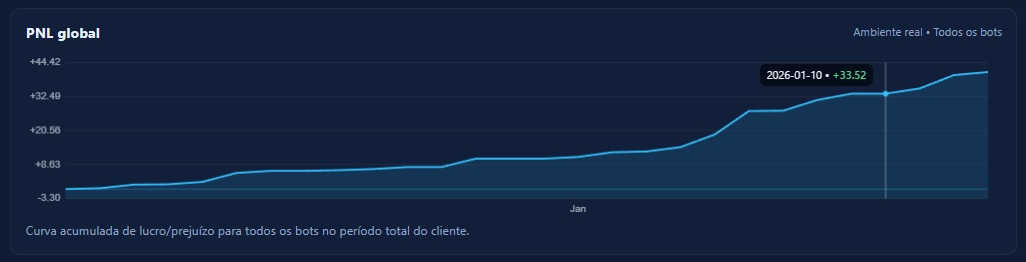
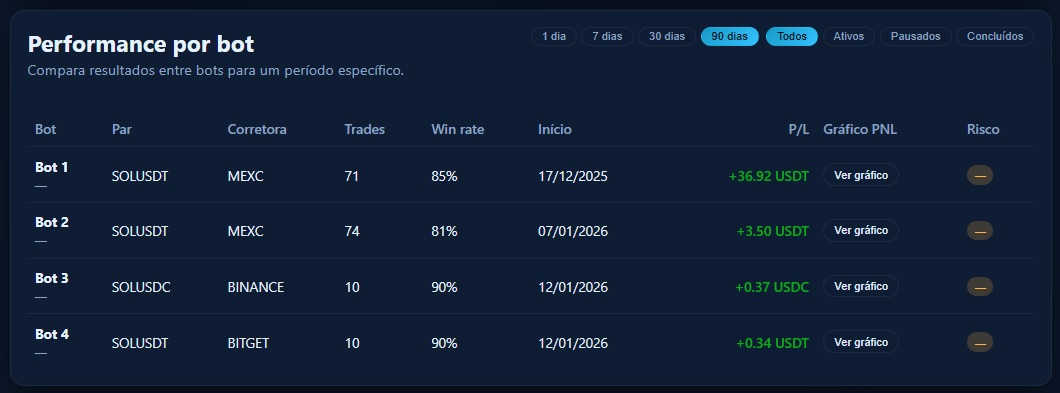
5. Track total P&L by period and by bot

Account-level and per-bot breakdown

Monitor cumulative P&L and track performance over time — both for the overall account and per bot.

Global P&L chart P&L chart by bot

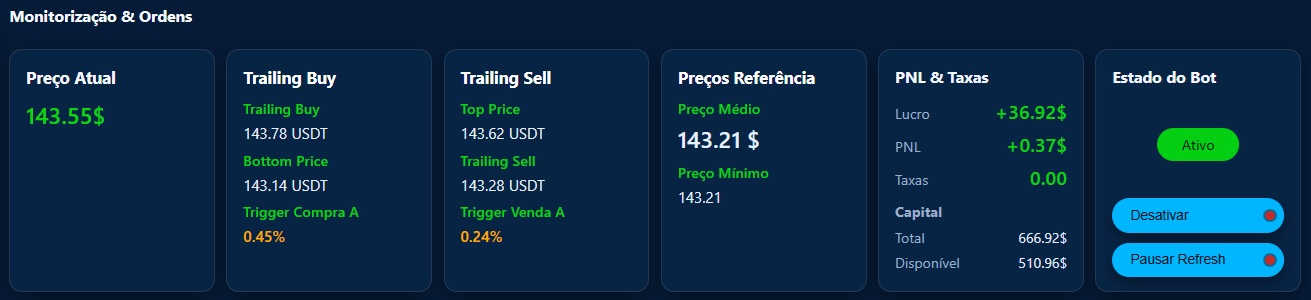
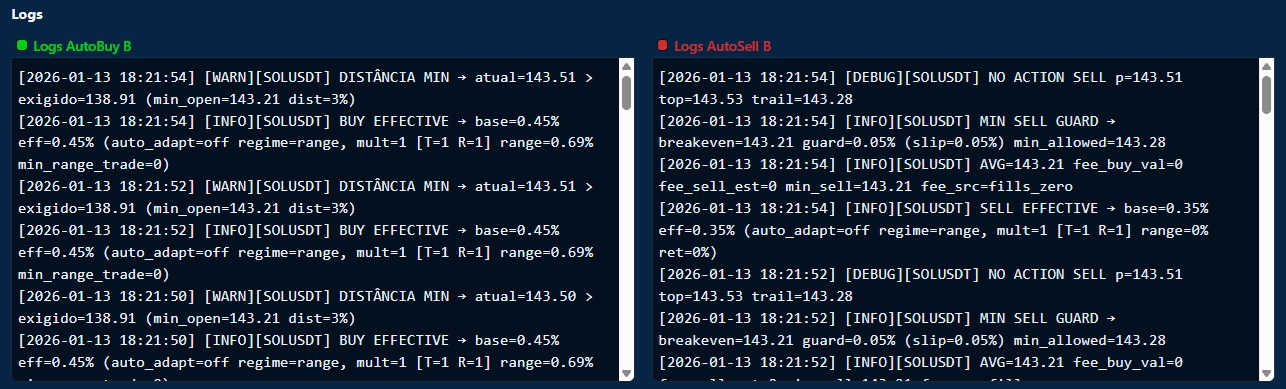
6. In the bot dashboard, track price, trailings, and execution state

Track price and execution decisions in real time

Track the Current Price, Trailing Buy, Trailing Sell, reference levels, P&L, fees, and bot status in real time.

Dashboard with trailings Bot logs and P&L

Supported exchanges

SPOTGOBOT prioritizes robust integrations with a small set of exchanges to ensure execution quality, testing coverage, and fast support.

Currently available on:

The list may expand over time, but new integrations will be added in spot mode, following the same non-custodial security model.

Want to test these features with a small amount of capital?

Start in test mode or with small size, observe how each parameter impacts entries/exits and exposure, and only then scale up. The dashboard exists precisely to make tuning controllable. This dashboard is not available on the Starter plan.